Recovery
Please read the overview page first!
BIOS Update through BMC
Following instruction was tested on:
- X11SSH-TF v1.01
For information how to identify your mainboard model pelase check faq.
Following documentation describes the process of recovering hardware from brick state with through BMC BIOS Update feature. This feature can be used also for initial deployment and Firmware Update.
Requirements
License activation
Without active license you can't use BIOS Update feature. License key can be
generated using kasuganosoras
scripts and
entered through BMC web interface (Miscellaneous->Activate License).
Up to date firmware
Please make sure you using firmware revision 01.60
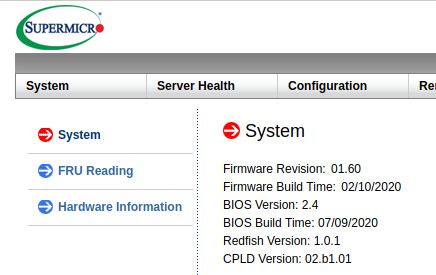
If not please follow IPMI Firmware Update_NEW.pdf instruction from package
that you can download
here.
Unfortunately most efficient way to interact with proprietary BMC is to use Supermicro proprietary closed source tools:
- Supermicro Update Manager please download and unpack archive.
- Backup or Supermicro BIOS update please download and unpack archive.