Preparing Ubuntu for SMI Transfer Monitor
Introduction
The SMI Transfer Monitor (STM) is a hypervisor running in VMX root mode at privilege level -1. It provides isolation and protection for System Management Mode (SMM) handlers by interposing on all SMIs while the OS is running. Using STM on Linux requires two components:
- A patched KVM driver that exposes two new ioctls
(
KVM_BUMP_USAGE_COUNTandKVM_DEC_USAGE_COUNT) to prevent the CPU from exiting VMX mode while STM is active, which would otherwise cause a GP fault and kernel panic. - The
dual_monitor_modekernel module from the stm_linux_module repository, which manages STM startup, shutdown, and platform power state transitions (suspend, hibernate). It is a Dasharo fork of Eugene d. Myers' stm_linux_module with compilation fixes for newer kernels.
Note
This guide covers Ubuntu 26.04 (Linux 7.0.0). The KVM patch in the original repository was written for Linux 5.10.120, but was updated to apply to Linux 7.0 on Dasharo fork. Still, the patch file may not apply cleanly to all Linux versions and must be adapted manually as described below.
Warning
You will have to disable kernel lockdowns, Secure Boot, and load unsigned kernel modules to make it work. Do not attempt it unless you are aware of the risks involved with the process.
Limitations
No Intel TXT integration on Sapphire Rapids and Emerald Rapids
The SINIT ACMs published for 4th and 5th Generation Intel Xeon Scalable processors (Sapphire Rapids and Emerald Rapids) do not implement STM support. Consequently, on these platforms Intel TXT and STM are not integrated:
- The STM is not measured by a dynamic launch. The ACM neither validates nor measures the contents of MSEG, so no PCR in the DRTM chain (PCR 17/18) reflects which STM is present, or whether an STM is present at all.
- The STM cannot be constrained by a Launch Control Policy. An LCP can govern the MLE, but it has no way to require a specific STM measurement.
- Attestation of the MLE says nothing about SMM protection. A verifier inspecting the DRTM quote of a TXT-launched hypervisor cannot tell whether SMI handlers are being interposed by an STM.
Trust in the STM therefore rests on the static chain of trust rather than on the dynamic one: the STM image is part of the firmware image, measured into PCR 0 by the SRTM at boot, and protected at runtime by the platform's firmware protections (Intel Boot Guard, SPI flash write protection and SMM BIOS write protection).
Note
This is a limitation of the Intel-signed SINIT ACM, not of Dasharo, and it cannot be worked around in firmware. Lifting it requires an ACM release from Intel that implements the STM checks defined by the TXT and STM specifications.
The limitation is confined to the measurement and launch-control side of TXT. It does not affect the STM's runtime function: once launched through the OS opt-in path, the monitor still interposes on every SMI and confines SMI handlers to the memory, I/O and MSR resources they have declared.
Prerequisites
- Intel x86_64 system with VT-x (VMX) support
- Dasharo firmware with STM support enabled
- At least 10 GB of free disk space for the kernel source and build artifacts
Verify that VMX is available on your system:
$ grep -m1 vmx /proc/cpuinfo
The output must contain the vmx flag. If it is absent, STM cannot run on
this system.
Preparing to launch STM
Step 0: Running STM capable firmware
To use STM the firmware must enable STM in the build and place it in special memory area. Follow the board-specific flashing/update documentation how to flash the firmware, if you have a firmware binary with STM.
STM in Dasharo is runtime configurable in the setup menu. If you see STM
option in the Setup Menu -> Dasharo System Features -> Dasharo Security
Options then it means your firmware supports STM:
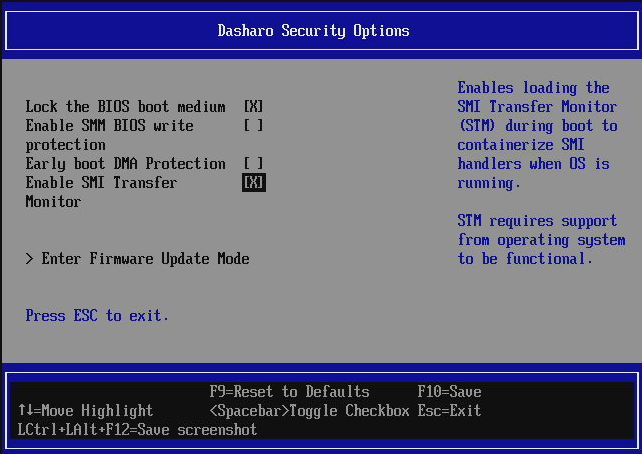
Enable the STM option first (default disabled) before proceeding with next steps and modules compilation. Save settings and reset the board.
Step 1: Install Build Dependencies
$ sudo apt update
$ sudo apt install -y \
    build-essential \
    git \
    bc \
    flex \
    bison \
    dwarves \
    dpkg-dev \
    zstd \
    gawk \
    pahole \
    libdw-dev \
    libdwarf-dev \
    libelf-dev \
    libssl-dev \
    linux-source \
    linux-headers-$(uname -r)
Step 2: Prepare the Kernel Source Tree
Obtain and prepare the kernel source. Set the KDIR variable for use in
later steps.
$ cd /usr/src/linux-source-7.0.0/
$ sudo tar --strip-components=1 -xvf linux-source-7.0.0.tar.bz2 >/dev/null
$ export KDIR=/usr/src/linux-source-7.0.0
$ cd ${KDIR}
$ sudo cp /boot/config-$(uname -r) .config
$ sudo make olddefconfig
$ sudo make scripts prepare modules_prepare
# linux-source package does not contain certificates, so we have to unset them
$ sudo scripts/config --set-str SYSTEM_TRUSTED_KEYS ""
$ sudo scripts/config --set-str SYSTEM_REVOCATION_KEYS ""
Step 3: Clone the stm_linux_module Repository
$ cd ~
$ git clone https://github.com/Dasharo/stm_linux_module.git
Step 4: Adapt the KVM Patch
The repository provides linux_stm_patches.patch, which targets Linux
5.10.120. However, on Dasharo fork the patch has been updated and will apply
on Linux v7.0. Otherwise, the changes must be applied manually to two files.
The patch adds two ioctl commands that let the dual_monitor_mode module
increment and decrement the KVM internal usage counter, keeping the CPU in
VMX mode for as long as STM needs it. The ioctl numbers 0x20 and 0x21
are unassigned in the KVMIO namespace on both kernel versions.
To patch the file automatically, use the following commands:
$ sudo cp ~/stm_linux_module/linux_stm_patches.patch ${KDIR}
$ cd ${KDIR}
$ sudo patch -p1 < linux_stm_patches.patch
patching file include/uapi/linux/kvm.h
patching file virt/kvm/kvm_main.c
# Also copy the modified header to linux-headers location
sudo cp include/uapi/linux/kvm.h \
    /usr/src/linux-headers-$(uname -r)/include/uapi/linux/kvm.h
If it has applied successfully, you may skip steps 4.1 and 4.2.
4.1 Add the ioctl definitions to kvm.h
Open ${KDIR}/include/uapi/linux/kvm.h in a text editor. Locate the block
of #define KVM_* entries that use the _IO, _IOR, _IOW, or _IOWR
macros and add the following two lines:
#define KVM_GET_MSR_INDEX_LIST    _IOWR(KVMIO, 0x02, struct kvm_msr_list)
+/* Bumps the KVM usage count for the STM */
+#define KVM_BUMP_USAGE_COUNT  _IO(KVMIO, 0x20)
+ /* Decrements the KVM usage count for STM breakdown */
+#define KVM_DEC_USAGE_COUNT   _IO(KVMIO, 0x21)
Verify that these numbers are free in your tree before adding them:
$ grep -n "KVMIO, 0x2[01]" ${KDIR}/include/uapi/linux/kvm.h
No output means 0x20 and 0x21 are available. If there is a conflict,
choose the next free pair of values and use them consistently in both files.
Make the same changes in the installed linux-headers by copying the modified file:
sudo cp ${KDIR}include/uapi/linux/kvm.h \
     /usr/src/linux-headers-$(uname -r)/include/uapi/linux/kvm.h
4.2 Add the ioctl handlers to kvm_main.c
Open ${KDIR}/virt/kvm/kvm_main.c. Find the function kvm_dev_ioctl() and
locate its switch statement. Add the two new cases after the case
KVM_CHECK_EXTENSION: label:
case
KVM_CHECK_EXTENSION:
r = kvm_vm_ioctl_check_extension_generic(kvm, arg);
break;
+ case KVM_BUMP_USAGE_COUNT:
+ kvm_usage_count++;
+ r = 0;
+ break;
+ case KVM_DEC_USAGE_COUNT:
+ kvm_usage_count--;
+ r = 0;
+ break;
Move static int kvm_usage_count; variable declaration above the
kvm_vm_ioctl implementation:
+static int kvm_usage_count;

static long kvm_vm_ioctl(struct file ...
Step 5: Build the Patched KVM Modules
For in-tree module builds, modpost reads vmlinux symbol CRCs exclusively
from vmlinux.o - KBUILD_EXTRA_SYMBOLS is only honoured by external
(M=) builds and is silently ignored here. The way to resolve
cross-module dependencies (e.g. irqbypass → kvm) without duplicating
symbol sources is to build all affected modules in a single make
invocation, so that modpost processes all three .o files together:
cd ${KDIR}
# Compile the kernel core and produce vmlinux.o (~20–60 min depending
# on hardware). KVM is =m in Ubuntu, so our kvm_main.c changes do not
# affect this step.
sudo make -j$(nproc) vmlinux
Next build the KVM modules:
# Build irqbypass and both KVM modules in one invocation.
# modpost resolves the irqbypass → kvm dependency internally because it
# processes all three .o files in the same run. vmlinux symbols come only
# from vmlinux.o - no extra symbol files needed, no duplicates.
sudo make -j$(nproc) \
    virt/lib/irqbypass.ko \
    arch/x86/kvm/kvm.ko \
    arch/x86/kvm/kvm-intel.ko
After a successful build, the patched modules are located at:
${KDIR}/arch/x86/kvm/kvm.ko${KDIR}/arch/x86/kvm/kvm-intel.ko
Strip the .BTF and .BTF_ids ELF sections from both modules before
installing. The BTF metadata produced by our build does not match the
running kernel's own BTF, which causes a failed to validate module BTF:
-22 error in dmesg. Stripping these sections prevents the validation
attempt; KVM functionality is unaffected:
sudo objcopy --remove-section=.BTF \
        --remove-section=.BTF_ids \
        ${KDIR}/arch/x86/kvm/kvm.ko
sudo objcopy --remove-section=.BTF \
        --remove-section=.BTF_ids \
        ${KDIR}/arch/x86/kvm/kvm-intel.ko
Step 6: Replace the Running KVM Modules
Warning
The following steps overwrite system KVM modules. Keep a recovery method available (live USB, serial console, or SSH from a second machine) before proceeding.
Identify the module paths for the running kernel and back them up:
$ KVM_DIR=/lib/modules/$(uname -r)/kernel/arch/x86/kvm
$ sudo cp ${KVM_DIR}/kvm.ko.zst{,.bak}
$ sudo cp ${KVM_DIR}/kvm-intel.ko.zst{,.bak}
Ubuntu stores kernel modules as zstd-compressed .ko.zst files. Compress
the newly built modules before installing:
$ zstd -19 -f ${KDIR}/arch/x86/kvm/kvm.ko -o ~/kvm.ko.zst
$ zstd -19 -f ${KDIR}/arch/x86/kvm/kvm-intel.ko -o ~/kvm-intel.ko.zst
$ sudo cp ~/kvm.ko.zst ${KVM_DIR}/kvm.ko.zst
$ sudo cp ~/kvm-intel.ko.zst ${KVM_DIR}/kvm-intel.ko.zst
$ sudo depmod -a
If the system uses AMD instead of Intel, replace kvm-intel with kvm-amd
in all commands above.
Reload the KVM stack:
$ sudo rmmod kvm_intel kvm
$ sudo modprobe kvm
$ sudo modprobe kvm_intel
Verify the modules loaded without errors:
$ dmesg | tail -20
$ lsmod | grep kvm
Step 7: Build the dual_monitor_mode Module
$ cd ~/stm_linux_module
$ make
Step 8: Install and Load the Module
$ sudo make install
$ sudo modprobe dual_monitor_mode
If you see an modprobe: FATAL: Module dual_monitor_mode not found in
directory /lib/modules/<version>, try to load the module directly from local
directory:
$ sudo modprobe ./dual_monitor_mode.ko
Verify the module is loaded:
$ lsmod | grep dual_monitor_mode
Verification
Check the kernel log for STM activity:
$ sudo dmesg | grep -i -E "stm|dual.monitor"
A successful initialization produces log lines from the dual_monitor_mode
module indicating that VMX mode is being maintained and the STM handshake
with the firmware completed.:
19 STM-LINUX: starting launch_stm on all processors
0 STM-LINUX - starting launch_stm
0 STM-LINUX: Opt-in to STM commences
0 STM-LINUX: STM_API_INITIALIZE_PROTECTION succeeded
...
13 STM-LINUX: Opt-in to STM commences
19 STM-LINUX - starting launch_stm
17 STM-LINUX - starting launch_stm
14 STM-LINUX: Opt-in to STM commences
12 STM-LINUX: Opt-in to STM commences
15 STM-LINUX: Opt-in to STM commences
16 STM-LINUX: Opt-in to STM commences
19 STM-LINUX: Opt-in to STM commences
18 STM-LINUX: Opt-in to STM commences
17 STM-LINUX: Opt-in to STM commences
11 STM-LINUX: Opt-in to STM commences
19 STM-LINUX: STM apparently launched (1)
You may also use cbmem utility to dump firmware log. It should also contain output from the STM:
$ sudo cbmem -1 | grep "(STM)"
Example output:
(STM) ELF Relocation in progress Base 4B130000 Reloc tables 4B15A520
(STM) 363 locations to be relocated
(STM) ELF Relocation done
(STM) MsegBase (MSR) - 4B130000
(STM) MsegLength (end of TSEG) - 00ED0000
(STM) Cr30Offset - 00032000
(STM) Page Table Start - 4B162000
(STM)    ********************** STM/PE *********************
(STM) !!!STM build time - Aug  7 2026 10:36:30!!!
(STM) !!!STM Relocation DONE!!!
(STM) !!!Enter StmInit (BSP)!!! - 0 (10007)
...
(STM) 19 CurrentVmcs - 000000010221F000 VmcsSize 1000
(STM) 6 !!!LaunchBack!!!
(STM) 7 !!!LaunchBack!!!
(STM) Setting up SMI Handler for 32 bit mode
(STM) 16 !!!LaunchBack!!!
(STM) 12 !!!LaunchBack!!!
(STM) 1 !!!LaunchBack!!!
(STM) 15 !!!LaunchBack!!!
(STM) 17 !!!LaunchBack!!!
(STM) 11 !!!LaunchBack!!!
(STM) 14 !!!LaunchBack!!!
(STM) 19 !!!LaunchBack!!!
To confirm the STM works, try to set the BootTimeout variable to trigger SMI handler via EFI Runtime Services variable protocol, e.g.:
sudo efibootmgr -t 4
The command should return that the timeout is now 4 seconds and give no errors. If STM was not informed about all resources needed to perform flashing operation in SMM mode to update the variable, the cbmem log would contain:
(STM) 5 !!!EPTViolationHandler!!!
(STM) 5  Qualification - 0000000000000782
(STM) 5  GuestPhysicalAddress - 00000000BFCFC010
(STM) 5 SmmEPTViolationHandler - Add unclaimed MEM_RSC!
In the above example, the address 00000000BFCFC010 refers to the SPI
controller MMIO space, which was not yet allowed for SMI handler access during
the STM support development. Absence of additional messages or errors in cbmem
utility proves that SMI handler used for flash access work properly.